Quick answer
A medical clinic website with online appointment booking should help patients find the right department, show each doctor's next free slot, and book only times that are truly open. Every request should land in a front-desk confirmation queue, and patients should get a reference code to track their booking online. It must also work on a phone.
Key takeaways
- A symptom finder helps patients pick the right department.
- Doctor cards should show the next free slot, not just a bio.
- Every request needs a front-desk confirmation step.
- A reference code lets patients track their own booking.
Why is booking harder for a multispecialty clinic?
A single-doctor office has one calendar. A multispecialty clinic has many doctors, many departments and many schedules. That is where most clinic websites break down.
Patients do not always know which department they need. They may not know which doctor is free this week. So they call. Your phone lines fill up, and patients who cannot get through look elsewhere.
A good medical clinic website with online appointment booking takes those questions off the phone. It guides the patient to the right department, shows who is free and when, and hands your team a tidy list of requests to confirm. This guide uses Corvia Health, one of our ready-made clinic websites, as the worked example. You can open the Corvia live demo and follow along.
How do you help patients choose the right department?
Department names like Neurology or Gastroenterology mean little to many patients. They know what they feel, not where it belongs.
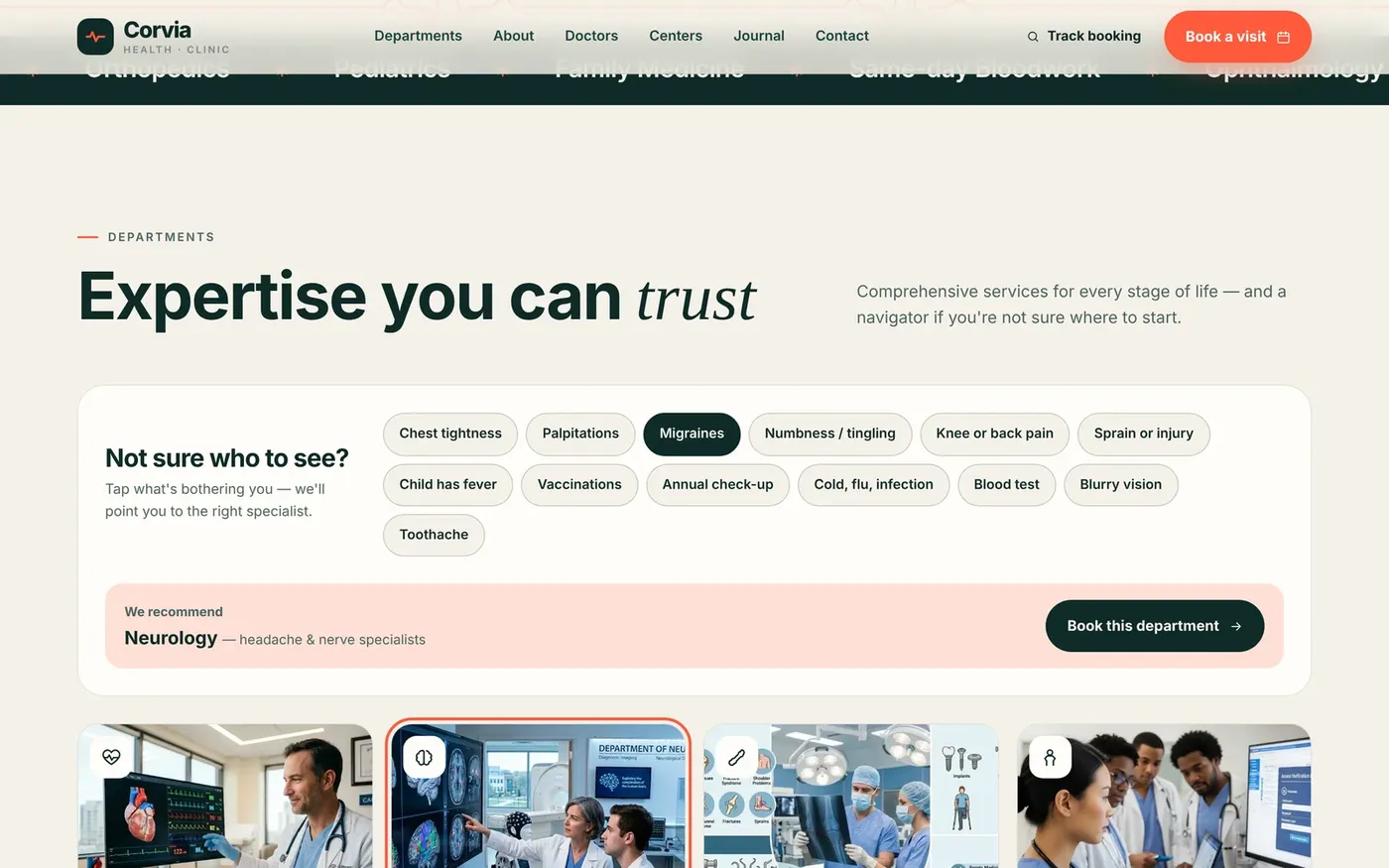
Corvia includes a symptom navigator. The patient taps a symptom and the site recommends a department, with a one-tap button to book. For example, tapping migraines points to Neurology. The site also has eight department and doctor pages, plus tabbed specialty centers that list services with a direct booking button for each.
This also helps your schedule. When patients land in the right department the first time, fewer bookings need to be moved, and your doctors spend their slots on the patients they are best placed to see. Fewer calls asking "who should I see?" also frees up your front desk.
Be clear about what this tool is. It is a way to route a booking, not medical advice. Your wording should tell patients to seek urgent care for emergencies, and your clinicians decide the actual care. You control the symptom list and the departments it points to.
Why should doctor profiles show the next free slot?
Most clinic websites treat doctor pages as bios. Name, photo, qualifications and nothing to act on. The patient then has to call to ask when that doctor is available.
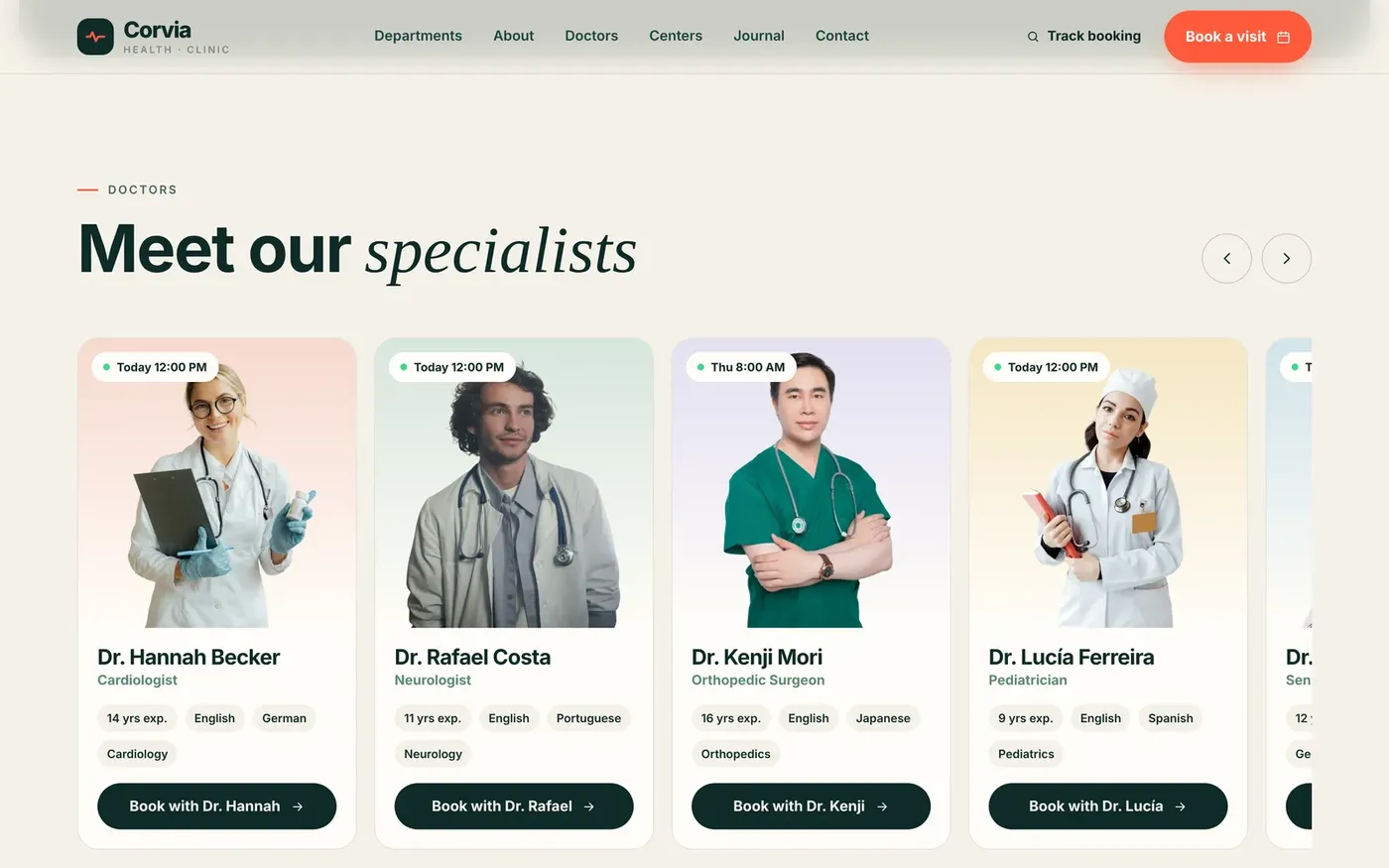
On Corvia, every doctor card shows that doctor's next available time and books straight into their calendar. This turns a passive profile into a booking point. It also helps spread demand. A patient who sees one doctor is busy until next week may choose a colleague who is free tomorrow.
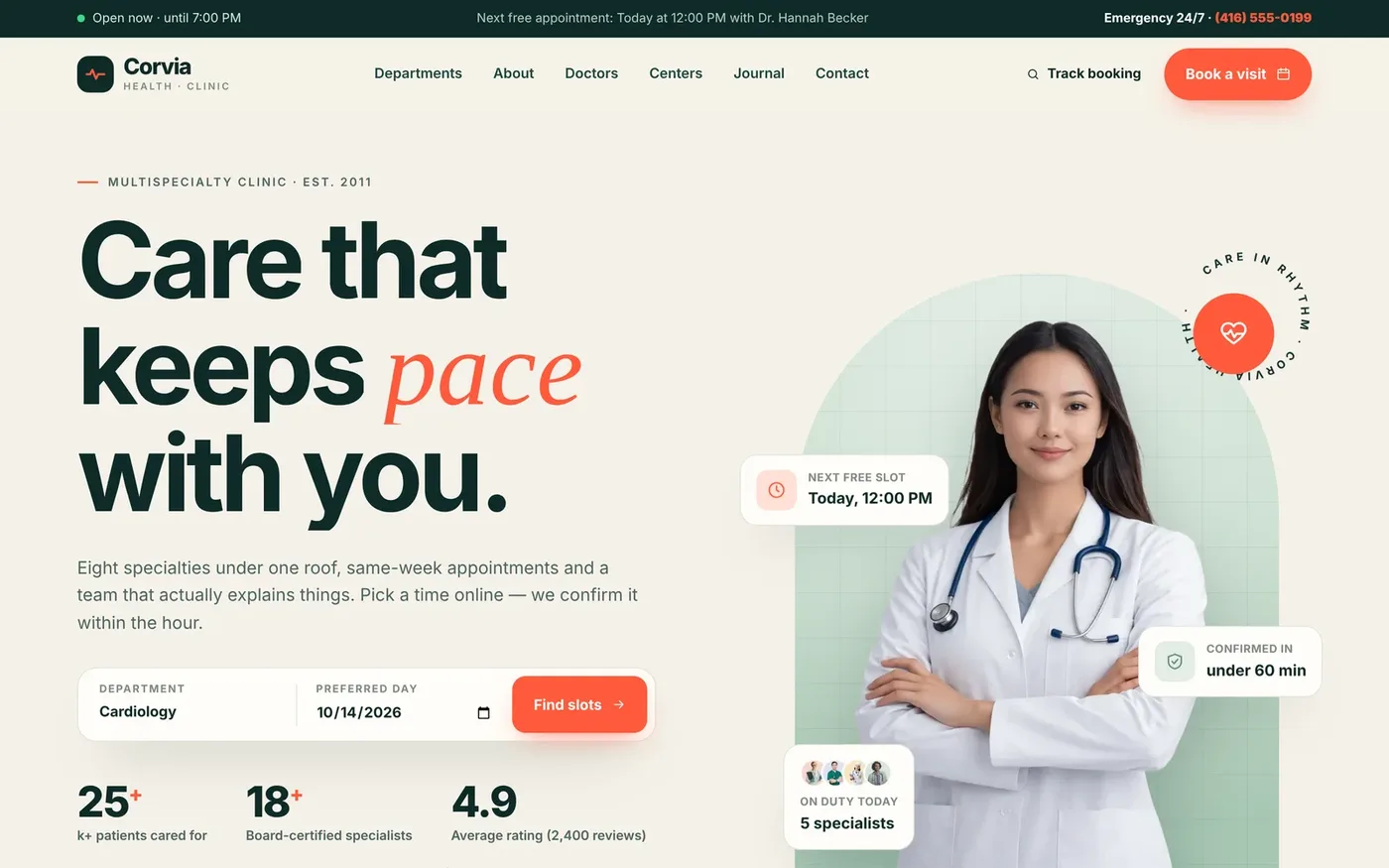
The homepage works the same way. Its hero shows the clinic's real next free slot and whether the clinic is open or closed right now, worked out from your clinic hours. A patient who arrives from a search result sees straight away that they can be seen soon, without digging through menus.
What does a good clinic booking flow look like?
Keep it short. Every extra screen is a chance for the patient to give up. Corvia uses four steps:
- Choose a department, or arrive from the symptom navigator with it already chosen.
- Choose a doctor.
- Pick a date and time from a 21-day date strip. Free slots are shown per day. Booked times are crossed out, and doctors' days off are respected.
- Enter details. The patient picks an in-clinic or video consult, fills in their details and gives consent to be contacted.
The patient then gets an instant reference code, a booking summary and an add-to-calendar file.
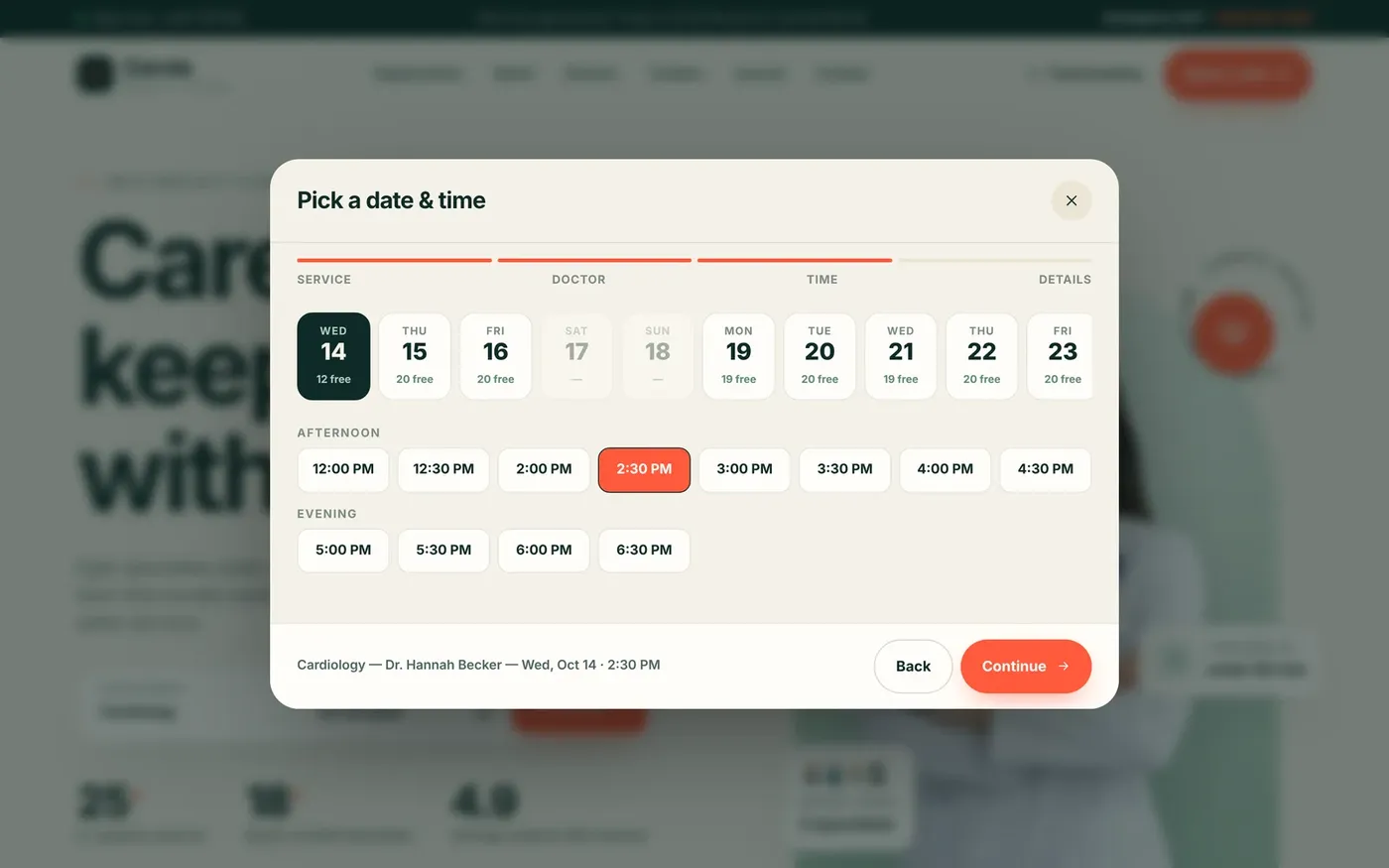
Behind the scenes, slots follow your clinic hours, lunch break, slot length, holidays and each doctor's working days. Change any of those in the admin panel and the website's slots update straight away.
How should staff confirm and manage appointments?
Online requests need a human check. Maybe a patient booked the wrong department. Maybe a doctor called in sick. A confirmation step catches these before the patient shows up.
Corvia's front-desk panel is protected by a PIN. The overview screen shows pending requests with one-click Confirm, today's schedule, the weekly load by department and recent activity.
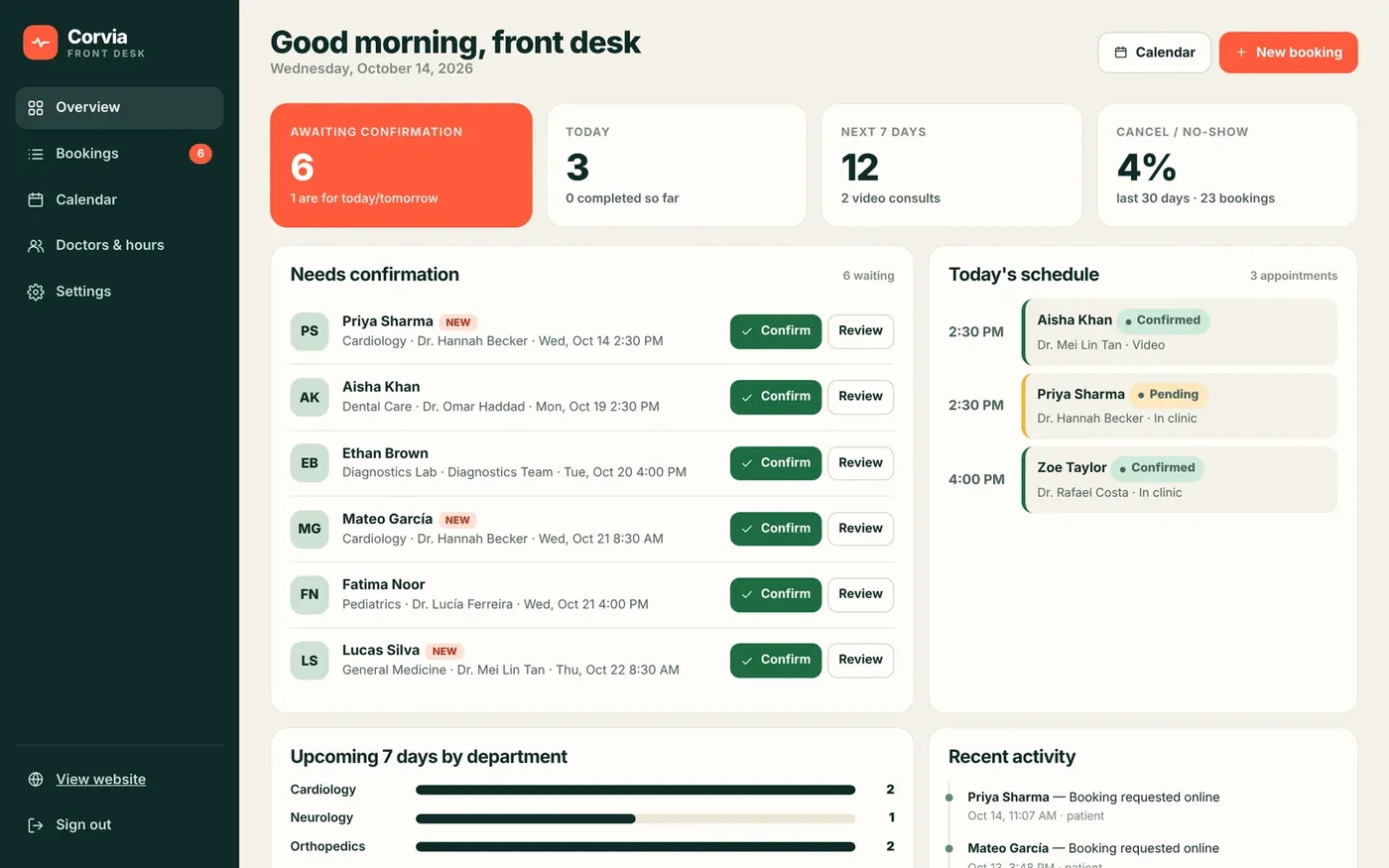
Confirming a booking opens a ready-made message your team can send with one click by WhatsApp or email.
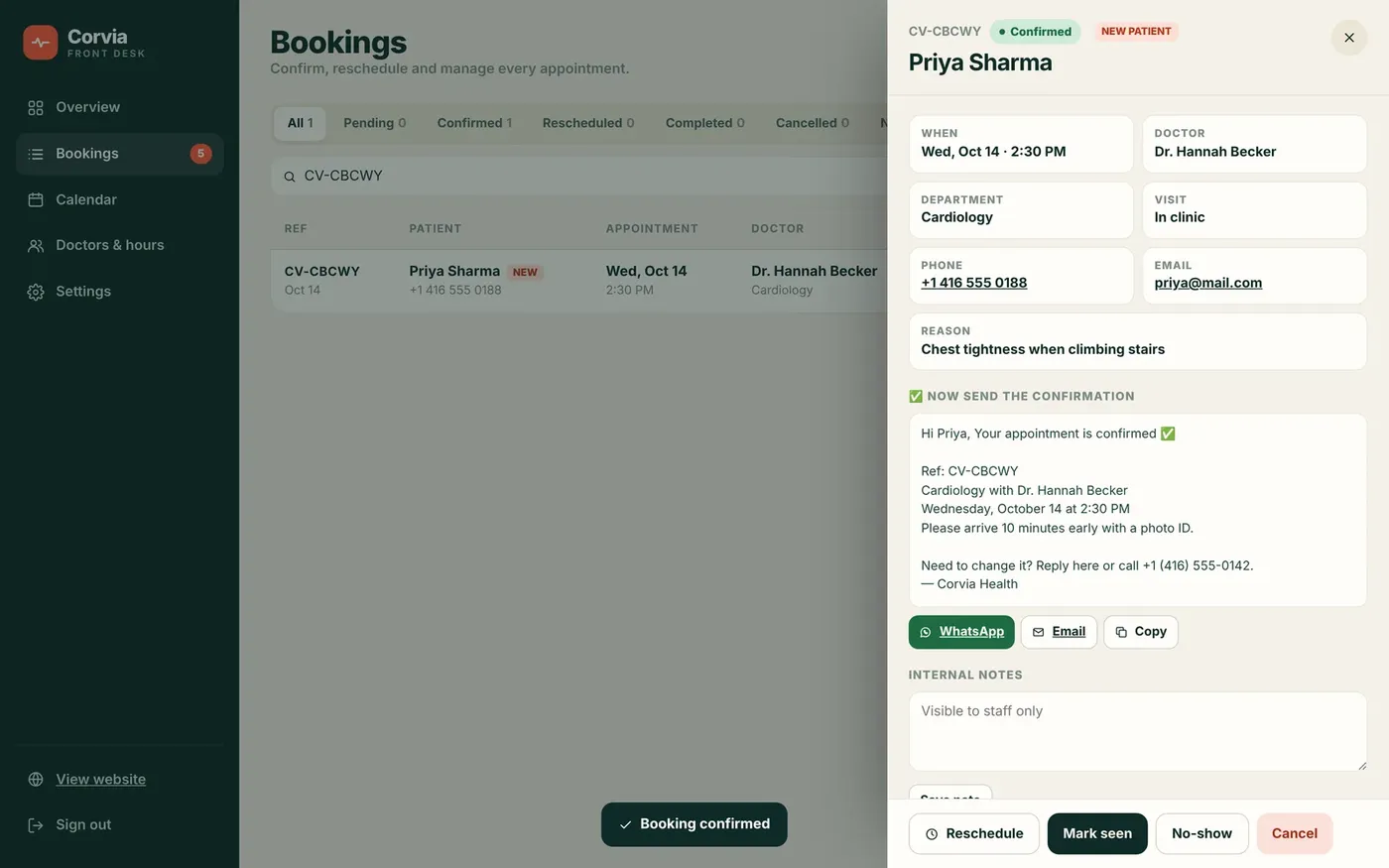
The panel also lets staff:
- Reschedule to any free slot. Clashes with other bookings are blocked automatically.
- Mark visits as seen or no-show.
- Search and filter every booking by status, department and date, then export to CSV.
- View a week calendar across all doctors, colored by status.
- Set each doctor's working days and days off.
- Turn on auto-confirm if you prefer to skip the manual step.
How can patients track their own appointment?
After booking, patients want to know one thing: is it confirmed? Without a way to check, they call.
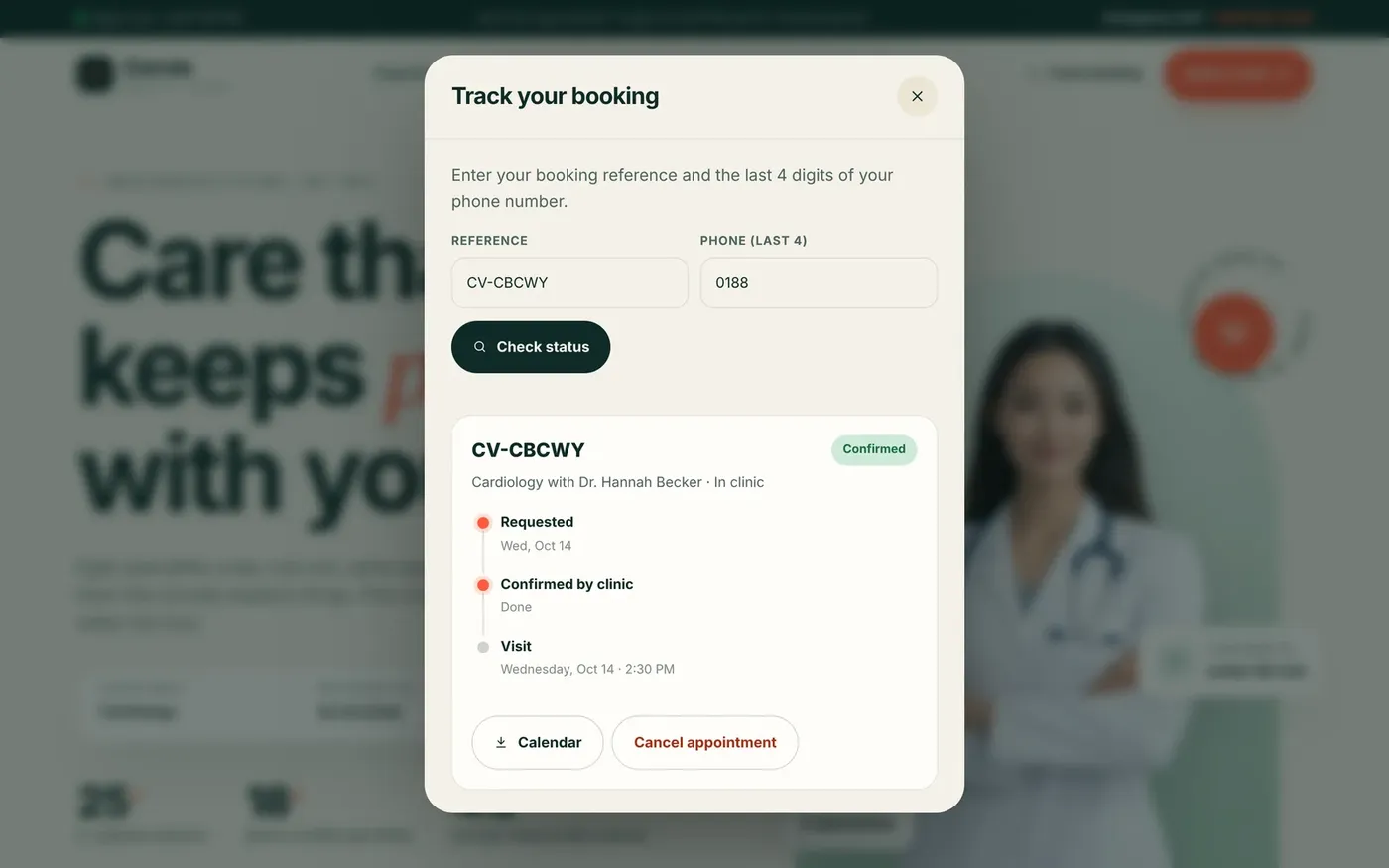
Corvia gives every patient a reference code. They use it on the site to see their status move from Requested to Confirmed to Visit. They can also cancel online, which frees the slot for someone else instead of leaving an empty chair.
The whole site, the booking flow and the admin panel are mobile-first, so patients and staff can use them from a phone.
A note on privacy. Your booking system collects patient names, contact details and sometimes symptoms. Rules such as HIPAA may apply to how that is stored and how you message patients, including by WhatsApp or email. Check your setup with your clinic's compliance advisor. This guide is not legal advice.
Checklist: does your clinic website book appointments well?
Run through this list on your current site:
- Patients can find the right department without calling.
- Each doctor shows a next free slot, not just a bio.
- Booking takes four steps or fewer.
- Only genuinely free slots are offered, per doctor.
- Lunch breaks, holidays and days off are blocked automatically.
- Patients can choose in-clinic or video, if you offer both.
- Every request gets a reference code.
- Staff confirm from a single queue and message patients in one click.
- Patients can track and cancel online.
- Your compliance advisor has reviewed how patient data is handled.
Each missing item usually means more phone calls and fewer completed bookings.
How to launch a clinic website like Corvia Health
Corvia Health is a ready-made website for multispecialty clinics, polyclinics and family practices, priced at $1,000 one-time. We rebrand it with your clinic name, logo, colors, content and photos, connect it to your own domain and remove all demo branding. You own the domain, the hosting and the site. It is built to WCAG 2.1 AA accessibility guidelines.
- Open the Corvia live demo and book a test appointment.
- Send an enquiry from our ready-made websites page or contact us directly.
- We reply within one business day. You pay only after that reply.
- Share your departments, doctors, hours and branding, and we set it up.
If your clinic needs something Corvia does not cover, see our custom website plans. They run from $500 to $5,000, with a $500 Booking Panel add-on. When you are ready for more patients, our marketing services include a free one-month demo. We are a remote team with no US office.
Want this done for you?
Ready-made websites from $500. Fixed prices, no contracts, and you own every account.